


Wordgrams - Crossword & Puzzle
4.65.01K Reviews
App Specs
- Version
- 1.68.25152
- Updated On
- License
- Free
- Downloads
- 1,000,000+
- Developer
- FunCraft Games
- Categories
- Word
- Platform
- Android, iOS
Screenshots
 Analysis by AppCompare
I like word games that fit into the gaps of a normal day: a short wait, a quiet break, or a few minutes before bed. Wordgrams - Crossword & Puzzle suits that mood by turning a crossword into a shared match rather than a solo page of clues. Its main appeal is the small tension of solving your part while another player works on theirs. That gives familiar wordplay a social rhythm, though it also means this is not the best choice if you want uninterrupted, self-paced solving.
Early goals make the first match approachable
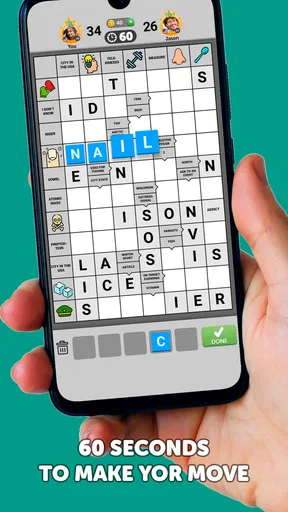
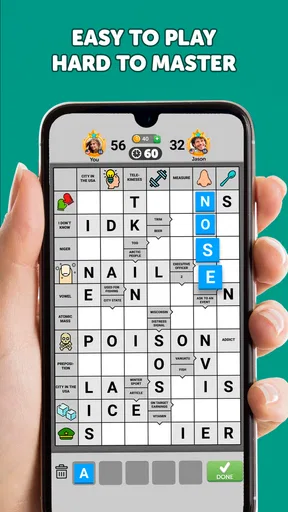
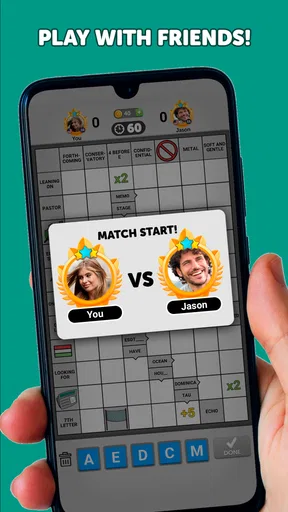
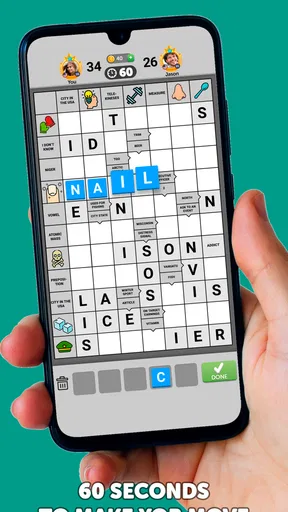
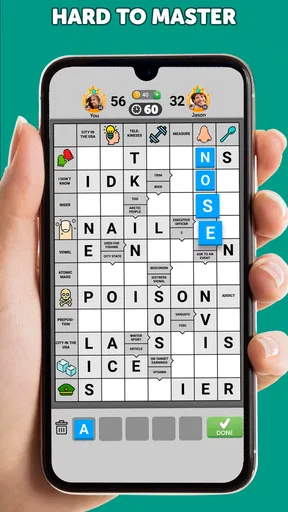
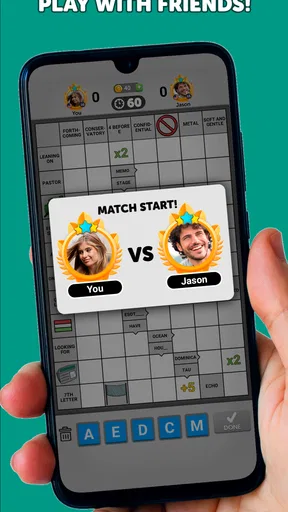
The first useful goal is simple: understand how the shared grid works and start making sensible entries. You and your opponent take turns, and each player sees only their half of the clues. That changes the usual crossword routine. A word you cannot solve alone may become clearer when crossing letters appear from the other side, so I found it helpful to think of every answer as a contribution to a joint puzzle, not just a point-scoring guess.
The tutorial gets the basic idea across quickly, which is helpful if you have played word games but have never tried this particular format. I would still take a moment to check the grid before rushing through a turn. A plausible word can create useful crossing letters, but an uncertain entry can also make later clues harder to read. My practical advice is to answer the clues you genuinely know first, then revisit the less obvious ones with the new letters in place.
Progress feels like solving, not collecting
The clearest sign of progress is the crossword taking shape. Each answer makes connected spaces more informative, and that gives the match a satisfying sense of movement even when a clue stalls you. In a conventional crossword, I can erase, pause, and work in any order without another person’s turn entering the picture. Here, progress is shared, so the board itself becomes a conversation: your choices give the other player more to work with, and their choices can open up your side.
That shared progress is also the game’s main trade-off. If you enjoy seeing a puzzle gradually resolve, it can be more engaging than a string of unrelated word challenges. If you prefer a clear personal score or a sequence of self-contained levels, the social match may feel less direct. I would treat each round as a small collaboration with a competitive edge, rather than expecting the tidy finish of a newspaper crossword.
The challenge depends on clues and crossings
The clues vary in difficulty, so a match can move between quick wins and moments where I have to sit with a word for a while. The crossing letters are especially useful when a clue has more than one possible interpretation. Instead of searching for an answer in isolation, I can use the pattern in the grid to narrow it down. That makes the game a good fit for people who like vocabulary but do not consider themselves crossword experts.
There is a limit to how much control I have over the challenge, though. In a solo puzzle, I can choose a themed crossword, pick a difficulty, or stop and return exactly where I left off. A match against another person has its own pace, and the opponent’s turn is part of the experience. If you want a demanding puzzle on your own schedule, a dedicated crossword app is likely a better fit; if you want clues with a bit of anticipation between turns, Wordgrams has the stronger hook.
Worth Reading Before You Choose

EA SPORTS FC Mobile 26 Is a Bigger Football Game, but It Takes Time

Flipboard Shows What News Apps Must Do Beyond the Feed

Switching to Android Auto Means Rethinking Your Driving Routine

Google Calendar Makes a Crowded Week Easier to Manage

Ludo King Makes the Most of the Minutes Between Plans

Baby Panda World Brings Quick Play to Modern Phones, but Its Game Library Feels Busy
Social play adds energy, with a few caveats
Playing against another word enthusiast gives the grid a human element that a standard crossword cannot quite reproduce. The chat option can make a match feel friendly, whether you are exchanging a quick greeting or reacting to a clever answer. I see that as a pleasant extra rather than the reason to install the game: the core activity should be enjoyable even if you are not interested in chatting.
The social format also asks for patience. Unlike a puzzle that moves only when you do, a shared match depends on taking turns, so it may not deliver an immediate finish whenever you open the app. That is worth considering if you mainly want a compact offline-style activity with no waiting on another player. For a casual daily routine, I would start a match when I have time to return to it, rather than expecting every session to fit neatly into one short break.
A realistic use is a commute break or a pause between errands: solve the clues you can, leave the trickier ones for a fresh look, and come back when the other half of the grid has changed. That second visit is not wasted time; new crossing letters can make a clue suddenly obvious. I would avoid starting a match when I need a puzzle with a guaranteed endpoint before putting my phone away.
How the game’s rhythm holds up over time
I find that a shared crossword asks for a different kind of commitment than a solo puzzle: progress comes in brief visits, and a pause can leave room to reconsider a clue rather than simply interrupting play. That rhythm suits a relaxed routine, but it can frustrate anyone who wants a definite finish on demand. The next question is whether those small returns keep the challenge feeling worthwhile.
Getting Started: Easy Peasy
Jumping into Wordgrams is a breeze. Once you download and open the app, you’re greeted with a slick, user-friendly interface. You can either sign up with an email or connect via social media. I chose to sync it with my Facebook account, which made it super easy to find friends who are already playing.
After setting up, you’re thrust right into the action. The app smartly provides a quick tutorial to get you acquainted with the gameplay mechanics. Within minutes, you’re ready to challenge your first opponent. Trust me, it’s intuitive enough that even if puzzles aren’t your jam, you’ll catch on quickly.
The Gameplay: A Sweet Challenge
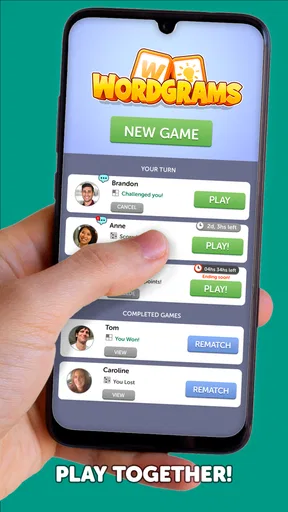
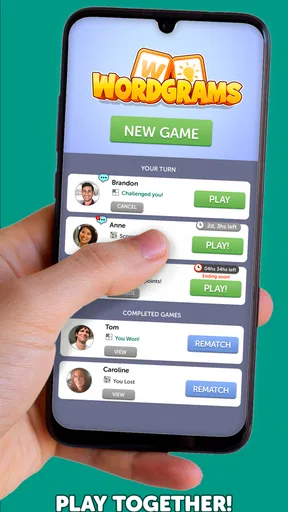
So, let’s talk gameplay. Each match consists of several rounds, and you take turns with your opponent to fill in the crossword. The clues range from ridiculously easy to head-scratchingly difficult, which keeps things interesting. The app’s smart AI pairs you with players of similar skill levels, so the challenge remains balanced.
One of the coolest features is the ability to chat with your opponent during the game. Whether you’re looking to trash-talk (in good fun, of course) or offer a friendly "good game," the chat feature adds a social layer that’s often missing in puzzle games.
Visuals and Sound: Easy on the Eyes and Ears
The design of the app is sleek and modern. The color scheme is pleasant, making it easy to stare at the screen for extended periods without feeling fatigued. The animations are smooth, and the game doesn’t lag, which is always a plus.
As for the sound, it’s subtle and non-intrusive. You won’t find any loud, distracting noises here. Instead, the gentle background music and sound effects complement the gameplay perfectly, creating a relaxed environment that lets you focus on solving those tricky clues.
Community and Updates: Always Something New
What keeps me coming back is the thriving community and the frequent updates. The developers seem committed to keeping the app fresh and engaging. There are seasonal events, new puzzles added regularly, and even themed challenges that spice up the regular gameplay.
The community is active, and finding a game doesn’t take long. Plus, the forums and social media groups are buzzing with tips, tricks, and friendly banter among players. It’s nice to see an app that encourages such interaction.
Who will enjoy the pace, and who may not
I would recommend this to someone who likes crosswords but wants a reason to revisit the board, or to a word-game fan who enjoys a little competition alongside clue-solving. It is also approachable for a casual player: the familiar grid does not demand that you learn a complicated set of rules before getting started. FunCraft Games has made a word game with an easy entry point and a more distinctive shared-match format than a basic collection of solo puzzles.
I would steer away from it if your priority is a quiet, private crossword with complete control over difficulty and timing. The same goes for players who dislike turn-based interactions or would rather not use a social feature. A traditional crossword app is more suitable for focused solo solving; a quick word-search game is better when you want an answer-and-finish activity without waiting. Wordgrams occupies the middle ground: it asks for crossword thinking, but its rhythm comes from playing alongside someone else.
For a useful routine, I would keep one match for short, casual visits instead of trying to force a long session. Answer the clues that are clear, pay attention to how the crossing letters reshape the uncertain ones, and then stop before guessing becomes random. This approach makes the shared grid feel like a logic exercise rather than a race to fill every square. It is a small but meaningful distinction: accuracy and patience tend to be more satisfying here than tapping quickly just to make the board look full.
Cost, compatibility, and what to expect
The game is free to download, with in-app purchases ranging from $0.99 to $99.99 per item. I would begin without spending and see whether the turn-based format becomes part of your routine first. The existence of optional purchases is worth keeping in mind, especially if you prefer games with no paid extras, but it does not change the basic question of whether you enjoy the crossword match itself. It is rated for Everyone, and the current release is version 1.68.23719; Android support starts at version 7.0.
Its audience is substantial: the game has more than a million installs, a 4.6 average from around 46,000 ratings, and about 4,900 written reviews. Those figures suggest that many players find the format appealing, but they cannot tell you whether the pace suits your habits. I would use the first few matches to answer that for yourself: do you like returning to an evolving grid, or do you keep wishing you could finish a puzzle alone in one sitting?
Final Thoughts: A Must-Try for Puzzle Lovers
In a sea of mobile games, Wordgrams - Crossword & Puzzle stands out as a unique and engaging experience. It combines the satisfaction of solving puzzles with the thrill of competing against others. Whether you’re a crossword veteran or a newbie looking for a challenge, there’s something here for everyone.
So, if you’re in the mood for some brainy fun, give Wordgrams a shot. You might just find yourself hooked, just like I did. Happy puzzling!
My progression verdict
The goals and pacing work best when I think of progress as a series of small discoveries: a familiar clue solved, a crossing letter gained, and a difficult answer becoming less mysterious. The shared board gives ordinary crossword solving a reason to continue, while the other player’s turn prevents the experience from feeling entirely under my control. That tension is the game’s identity, not a flaw to be designed away.
Overall, I would try it if the idea of a crossword that unfolds with another player sounds more inviting than a stack of solo puzzles. I would skip it if waiting, chatting, or sharing the grid feels like an interruption rather than part of the fun. For me, the best reason to keep playing is not a promise of constant novelty; it is the satisfying moment when the pattern finally clicks and the shared puzzle moves forward.
Pros
- Engaging word puzzles for all skill levels.
- Visually appealing and user-friendly design.
- Regular updates with new challenges.
- Offers both solo and multiplayer modes.
- Encourages vocabulary expansion.
Cons
- May have occasional in-app ads.
- Requires internet for some features.
- Limited hints available per day.
- Some puzzles might be too easy for experts.
- In-app purchases can be pricey.
FAQs for Wordgrams - Crossword & Puzzle
What is Wordgrams - Crossword & Puzzle, and how does it work?
Wordgrams - Crossword & Puzzle is a word game that combines the elements of crosswords and puzzles, providing a unique twist on traditional word games. Players are tasked with solving crossword-style clues by dragging and dropping letter tiles into the correct positions. This game challenges your vocabulary and problem-solving skills while offering an engaging and interactive experience.
Is Wordgrams - Crossword & Puzzle available for both Android and iOS devices?
Yes, Wordgrams - Crossword & Puzzle is available for download on both Android and iOS platforms. You can find it on the Google Play Store for Android devices and the Apple App Store for iOS devices. Ensure your device meets the minimum system requirements for optimal performance and gameplay experience.
Are there any in-app purchases or ads in Wordgrams - Crossword & Puzzle?
Wordgrams - Crossword & Puzzle is free to download and play, but it does offer in-app purchases for additional features, hints, or to remove ads. The game includes ads that may appear between levels or during gameplay. Players can choose to make purchases to enhance their gaming experience or to support the developers.
How challenging is Wordgrams - Crossword & Puzzle for different skill levels?
Wordgrams - Crossword & Puzzle caters to a wide range of skill levels, from beginners to seasoned word game enthusiasts. The game starts with simpler puzzles and gradually increases in difficulty, presenting more complex challenges as you progress. This makes it accessible for new players while still providing a stimulating experience for advanced users.
Can I play Wordgrams - Crossword & Puzzle offline?
Yes, Wordgrams - Crossword & Puzzle can be played offline, allowing you to enjoy the game without an internet connection. This feature makes it a great option for travel or when you have limited access to Wi-Fi or mobile data. However, some features, like in-app purchases or updating the game, may require an internet connection.


